
Download SparKron - Mobilbank – Mobile Banking, Finance Management, Secure Transactions
Overview
SparKron - Mobilbank is a mobile banking application designed for customers of a specific financial institution, offering a streamlined way to manage personal and business finances directly from Android devices. Developed by Powered by SDC AS, the software enables users to access their bank accounts, monitor balances, review transaction histories, and perform essential financial operations remotely. Its primary purpose is to enhance accessibility and convenience by bringing core banking services into the palm of the user’s hand.
The application is tailored for individuals and professionals who require real-time access to their financial data while on the move. It supports common banking tasks such as fund transfers between accounts, bill payments, and e-invoice viewing. These features are particularly useful for users managing multiple accounts or handling time-sensitive financial responsibilities. While the software is marketed as user-friendly, the developer did not provide additional details about its target audience beyond its intended use by existing bank customers.
Real-world usage scenarios include daily expense tracking, remote fund transfers for business operations, and quick bill settlements. The app does not require users to have a new bank account—access is granted only to existing customers who create credentials via their net banking portal. This ensures a secure onboarding process but limits availability to a specific customer base.
Key Features & Capabilities
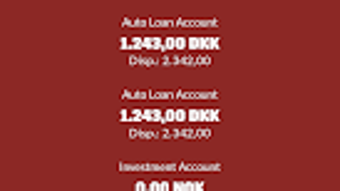
- Account Overview – Provides a clear summary of current account balances and recent transactions, allowing users to stay informed about their financial status at any time.
- Fund Transfers – Enables users to move money between linked accounts quickly and securely, supporting both internal and inter-account transfers.
- Bill Payments – Offers a built-in system for paying recurring and one-time bills, reducing the need for manual processing or physical visits to bank branches.
- E-Invoice Management – Allows users to view, download, and organize electronic invoices directly within the app, improving document accessibility and record-keeping.
- Transaction History – Maintains a detailed log of all financial activities, with filters for date, category, and amount for efficient review.
These capabilities support everyday financial management, especially for users who prefer digital-first banking. The interface design facilitates intuitive navigation, making it accessible even for less tech-savvy individuals. For example, a small business owner can use the app to verify payments, settle vendor invoices, and monitor cash flow without needing to log into a desktop banking system. Similarly, personal users can track spending habits and ensure timely bill payments.
User Interface, Workflow & Performance
The user interface of SparKron - Mobilbank is described as simple and easy to navigate, aligning with modern mobile design principles. The layout emphasizes clarity and functionality, with key actions like balance checks, transfers, and payments placed in accessible locations. Navigation is likely structured through a bottom tab bar or side menu, standard for Android applications in the finance category.
Workflow efficiency is enhanced by minimizing steps required to complete common tasks. For instance, initiating a transfer may involve selecting the source and destination accounts, entering the amount, and confirming with a single tap. The application’s design supports a smooth user journey, reducing the likelihood of errors during high-frequency transactions.
Performance observations are based on general software behavior patterns. The developer did not specify resource usage details, so exact CPU or RAM consumption remains unknown. However, the app’s 45.6 MB installation size suggests it is lightweight and optimized for devices with moderate storage capacity. Stability is expected to be consistent, given the nature of banking applications that prioritize reliability and uptime.
Compatibility & System Requirements
SparKron - Mobilbank is compatible with Android operating systems. The application version is 1.2.0, and the installation size is 45.6 MB. The developer did not specify minimum system requirements such as RAM, processor speed, or Android API level.
Platform compatibility information is limited to Android, which means the software is not available for iOS, Windows, or macOS. Users must ensure their device runs a supported version of Android, though the exact version range is not disclosed. The absence of detailed hardware or OS version requirements means users should rely on the Google Play Store’s compatibility checks during installation.
For those using older Android devices, performance may vary depending on device specifications. The developer did not provide information on backward compatibility or support for legacy systems.
Pros and Cons
Pros
- Free to download and use with no hidden fees
- Simple, intuitive interface suitable for users of all ages
- Real-time access to account balances and transaction history
- Supports essential banking operations like transfers and bill payments
- Enables e-invoice viewing and management
Cons
- Available only to existing bank customers; not open to the general public
- No information on system requirements or device compatibility beyond Android
- Does not support offline functionality; requires internet connection for full operation
- Limited to Android platform; no versions for iOS or desktop
FAQ Section
Is SparKron - Mobilbank available for iOS devices?
Currently, the application is only available for Android devices. There is no official version for iOS or other platforms.
Can I use SparKron - Mobilbank without a bank account?
No. Access to the application is restricted to existing customers of the bank. Users must first register through their net banking account to create a username and password.
Is the app secure for financial transactions?
The application is designed for secure banking operations. Users authenticate via credentials created through their net banking portal, which typically includes multi-layered security protocols.
How often are updates released?
Update frequency is not specified. Users should check the Google Play Store regularly for new versions and security patches.
Can I use the app offline?
Due to the nature of real-time banking services, offline functionality is not supported. An active internet connection is required to access account data and perform transactions.
Final Thoughts
SparKron - Mobilbank delivers a focused and functional mobile banking experience for existing customers of the associated financial institution. Its clean interface, essential features, and free access make it a practical tool for managing daily finances on the go. While its availability is limited to a specific user base and platform, it excels in providing core banking services with minimal friction.
For users already enrolled in the bank’s digital ecosystem, the app offers a reliable way to transfer funds, pay bills, and monitor transactions without visiting a branch. Its lightweight design and straightforward workflow enhance usability, particularly for those who value convenience and efficiency.
Despite the lack of cross-platform support and detailed system requirements, the application meets the expectations of a modern mobile banking tool. It represents a solid choice for eligible users seeking a secure, accessible, and efficient way to manage their finances.
Download SparKron - Mobilbank now







